31.ChatMessageHistory #
在多轮对话的应用场景中,记录用户与 AI 的历史消息对于上下文理解和持续对话非常重要。smartchain 仿照 LangChain 体系,提供了灵活可扩展的聊天消息历史管理基类 BaseChatMessageHistory 以及内存实现 InMemoryChatMessageHistory。
核心类
BaseChatMessageHistory(抽象基类)
- 作用:定义了通用对话历史的管理接口,包括消息的获取、添加和清空。
- 主要接口:
messages属性:获取历史消息的列表(通常是 BaseMessage 子类的对象组成)。add_user_message/add_ai_message:快速添加用户或 AI 消息。支持直接传字符串,也支持传入消息对象。add_message/add_messages:添加单条或多条消息。clear():清空消息历史(需子类实现)。
该抽象类本身不保存消息,仅规定了子类应有的标准方法和属性。
InMemoryChatMessageHistory(内存消息历史)
- 作用:将所有消息储存在内存列表
_messages中,适合单进程会话或临时测试用途。 - 特点:
- 继承自
BaseChatMessageHistory,完全按照标准接口实现。 - 消息实际存储为对象列表,每次访问返回副本,防止外部篡改内部历史。
clear()实现为直接清空列表。
- 继承自
应用场景
- 多轮人机对话记录与上下文管理。
- 需要对话历史回溯或上下文注入的大模型交互。
- 快速原型开发或单用户单会话的小规模应用。
后续也可以基于 BaseChatMessageHistory,拓展如数据库持久化、分布式缓存、文件存储等更复杂的历史管理方案,只需实现相应的接口即可无缝兼容对话主流程。
31.1. 31.InMemoryChatMessageHistory.py #
31.InMemoryChatMessageHistory.py
import os
#from langchain_deepseek import ChatDeepSeek
#from langchain_core.prompts import ChatPromptTemplate, MessagesPlaceholder
#from langchain_core.chat_history import InMemoryChatMessageHistory
#from langchain_core.messages import HumanMessage

# 导入智能链的对话模型类
from smartchain.chat_models import ChatDeepSeek
# 导入提示模板及消息占位符
from smartchain.prompts import ChatPromptTemplate, MessagesPlaceholder
# 导入人类消息类
from smartchain.messages import HumanMessage
# 导入内存对话历史类
from smartchain.chat_history import InMemoryChatMessageHistory

# 创建一个内存版的对话历史对象
history = InMemoryChatMessageHistory()

# 构建提示词模板,包含三部分:系统提示、历史消息占位以及用户输入
template = ChatPromptTemplate(
    [
        # 系统指令,设定 AI 的身份和风格
        ("system", "你是一个友好的 AI 助手。"),
        # 占位符,插入到当前对话历史
        MessagesPlaceholder("history"),
        # 用户输入,将在调用函数时被格式化
        ("human", "{question}"),
    ]
)
# 设置环境变量 DEEPSEEK_API_KEY 为你的API密钥
os.environ["DEEPSEEK_API_KEY"] = "sk-c4e682d07ed643e0bce7bb66f24c5720"
# 实例化一个对话大模型,模型名为 deepseek-chat,温度为0.7
llm = ChatDeepSeek(model="deepseek-chat", temperature=0.7)

# 定义一个对话函数,输入为用户问题,输出为 AI 回复文本
def chat(question: str):
    # 获取历史消息列表的副本
    history_messages = history.messages

    # 使用模板格式化所有输入(包括历史和本次问题)
    prompt_messages = template.format_messages(
        history=history_messages,
        question=question
    )

    # 调用大模型并获取响应
    response = llm.invoke(prompt_messages)

    # 把用户消息加入历史
    history.add_user_message(question)
    # 把 AI 回复内容加入历史
    history.add_ai_message(response.content)

    # 返回 AI 的文本回复
    return response.content

# ============以下用于演示多轮对话功能=============

# 第一轮对话
print("【第一轮】")
print("用户:我叫小明")
print(f"AI:{chat('我叫小明')}\n")

# 第二轮对话
print("【第二轮】")
print("用户:我的名字是什么?")
print(f"AI:{chat('我的名字是什么?')}\n")

# 第三轮对话
print("【第三轮】")
print("用户:请介绍一下我")
print(f"AI:{chat('请介绍一下我')}\n")

# ============显示完整历史记录===============

# 打印分隔线
print("=" * 50)
# 打印标题
print("历史记录:")
# 遍历历史中的所有消息,逐条输出
for i, msg in enumerate(history.messages, 1):
    # 判断消息类型,用户消息显示“用户”,否则为 AI
    role = "用户" if isinstance(msg, HumanMessage) else "AI"
    # 打印第 i 条历史消息
    print(f"{i}. [{role}] {msg.content}")
31.2. chat_history.py #
smartchain/chat_history.py
# 导入抽象基类ABC,以及抽象方法abstractmethod
from abc import ABC, abstractmethod
# 从当前包的messages模块导入基础消息类、人类消息类和AI消息类
from .messages import BaseMessage, HumanMessage, AIMessage

# 定义聊天消息历史的抽象基类,继承自ABC
class BaseChatMessageHistory(ABC):
    """
    聊天消息历史的抽象基类

    定义了存储和管理聊天消息历史的标准接口。
    """

    # 定义抽象属性messages,要求子类实现
    @property
    @abstractmethod
    def messages(self):
        """
        获取所有消息列表

        Returns:
            消息列表
        """
        pass

    # 添加用户消息的便捷方法,可以接收HumanMessage实例或字符串
    def add_user_message(self, message):
        """
        添加用户消息的便捷方法

        Args:
            message: HumanMessage 实例或字符串
        """
        # 如果参数已是HumanMessage实例,则直接添加
        if isinstance(message, HumanMessage):
            self.add_message(message)
        # 否则,将字符串封装成HumanMessage后添加
        else:
            self.add_message(HumanMessage(content=message))

    # 添加AI消息的便捷方法,可以接收AIMessage实例或字符串
    def add_ai_message(self, message):
        """
        添加 AI 消息的便捷方法

        Args:
            message: AIMessage 实例或字符串
        """
        # 如果参数是AIMessage实例,则直接添加
        if isinstance(message, AIMessage):
            self.add_message(message)
        # 否则,将字符串封装成AIMessage后添加
        else:
            self.add_message(AIMessage(content=message))

    # 添加单个消息,可以接收BaseMessage实例
    def add_message(self, message):
        """
        添加单个消息

        Args:
            message: BaseMessage 实例
        """
        # 实际上是调用批量添加,将单个消息变为只包含一个元素的列表
        self.add_messages([message])

    # 批量添加消息
    def add_messages(self, messages):
        """
        批量添加消息

        Args:
            messages: 消息列表
        """
        # 遍历所有消息
        for message in messages:
            # 检查类型是否为BaseMessage子类
            if not isinstance(message, BaseMessage):
                raise TypeError(f"消息必须是 BaseMessage 实例,但得到了 {type(message)}")
            # 调用子类实现的消息添加逻辑
            self._add_message_impl(message)

    # 定义抽象方法,子类需实现具体的单条消息添加逻辑
    @abstractmethod
    def _add_message_impl(self, message):
        """
        子类需要实现的添加消息的具体逻辑

        Args:
            message: BaseMessage 实例
        """
        pass

    # 定义抽象方法,子类需实现清空历史的具体逻辑
    @abstractmethod
    def clear(self):
        """清空所有消息"""
        pass


# 定义内存中的聊天消息历史实现类,继承自BaseChatMessageHistory
class InMemoryChatMessageHistory(BaseChatMessageHistory):
    """
    内存中的聊天消息历史实现

    将消息存储在内存列表中,适用于单进程应用。

    示例:
        python
        from smartchain.chat_history import InMemoryChatMessageHistory

        history = InMemoryChatMessageHistory()
        history.add_user_message("你好")
        history.add_ai_message("你好,有什么可以帮助你的吗?")

        # 获取所有消息
        messages = history.messages

        # 清空历史
        history.clear()
        ``
    """

    # 初始化方法,创建用于存储消息的私有列表
    def __init__(self):
        """初始化内存消息历史"""
        # 使用列表存储消息
        self._messages = []

    # 实现messages属性,返回消息列表的副本,避免外部修改内部状态
    @property
    def messages(self):
        """
        获取所有消息列表

        Returns:
            消息列表的副本
        """
        return self._messages.copy()

    # 实现消息添加逻辑,将收到的消息追加到列表末尾
    def _add_message_impl(self, message):
        """
        实现添加消息的具体逻辑

        Args:
            message: BaseMessage 实例
        """
        self._messages.append(message)

    # 清空内存中的所有消息
    def clear(self):
        """清空所有消息"""
        self._messages = []

    # 对象的字符串表示,用于便于调试
    def __repr__(self):
        """返回对象的字符串表示"""
        return f"InMemoryChatMessageHistory(messages={len(self._messages)})"
31.3 类 #
31.3.1 类说明 #
| 类名 | 主要功能 | 关键方法 |
|---|---|---|
| InMemoryChatMessageHistory | 内存中的聊天消息历史管理类 | __init__(), messages (属性), add_user_message(), add_ai_message(), clear() |
| ChatPromptTemplate | 多轮对话提示词模板类 | __init__(), format_messages(), invoke() |
| MessagesPlaceholder | 消息列表占位符类,用于在模板中插入历史消息 | __init__(variable_name) |
| HumanMessage | 用户消息类 | __init__(content), content (属性), type (属性) |
| ChatOpenAI | 与大语言模型对话的封装类 | __init__(), invoke(), stream() |
| AIMessage | AI 消息类(间接使用) | __init__(content), content (属性) |
| SystemMessage | 系统消息类(间接使用) | __init__(content), content (属性) |
31.3.2 类图 #
31.3.3 时序图 #
31.3.4 调用过程 #
31.3.4.1 初始化阶段 #
步骤1:创建内存消息历史对象(第16行)
history = InMemoryChatMessageHistory()InMemoryChatMessageHistory.__init__() 流程:
- 初始化私有列表:
self._messages = [] - 用于存储所有对话消息
步骤2:创建聊天提示词模板(第19-28行)
template = ChatPromptTemplate(
    [
        ("system", "你是一个友好的 AI 助手。"),
        MessagesPlaceholder("history"),
        ("human", "{question}"),
    ]
)
ChatPromptTemplate.__init__() 流程:
- 保存消息模板列表:
self.messages = [...] - 提取输入变量:调用
_extract_input_variables()- 从
("system", "...")提取:无变量 - 从
MessagesPlaceholder("history")提取:"history" - 从
("human", "{question}")提取:"question" - 结果:
self.input_variables = ["history", "question"]
- 从
步骤3:创建大语言模型实例(第31行)
llm = ChatOpenAI(model="gpt-4o-mini", temperature=0.7)31.3.4.2 运行时阶段 #
步骤1:调用 chat 函数(第60行)
chat('我叫小明')步骤2:获取历史消息(第36行)
history_messages = history.messagesInMemoryChatMessageHistory.messages 属性:
- 返回
self._messages.copy()(第一轮为空列表[])
步骤3:格式化提示词(第39-42行)
prompt_messages = template.format_messages(
    history=history_messages,
    question=question
)
ChatPromptTemplate.format_messages() 内部流程:
调用
_format_all_messages(kwargs)(第134行)遍历消息模板并格式化(第165-192行):
a. 处理
("system", "你是一个友好的 AI 助手。"):role, template_str = ("system", "你是一个友好的 AI 助手。") prompt = PromptTemplate.from_template(template_str) content = prompt.format(**variables) # 无变量,直接返回原字符串 formatted_messages.append(SystemMessage(content="你是一个友好的 AI 助手。"))b. 处理
MessagesPlaceholder("history"):# 在 _coerce_placeholder_value() 中处理 value = variables.get("history") # 获取传入的 history_messages # value = [] (第一轮为空) # 返回空列表 []c. 处理
("human", "{question}"):role, template_str = ("human", "{question}") prompt = PromptTemplate.from_template(template_str) content = prompt.format(question="我叫小明") # 格式化变量 formatted_messages.append(HumanMessage(content="我叫小明"))返回格式化后的消息列表:
[
    SystemMessage(content="你是一个友好的 AI 助手。"),
    HumanMessage(content="我叫小明")
]
步骤4:调用大语言模型
response = llm.invoke(prompt_messages)ChatOpenAI.invoke() 流程:
_convert_input()将消息列表转换为 OpenAI API 格式:messages = [ {"role": "system", "content": "你是一个友好的 AI 助手。"}, {"role": "user", "content": "我叫小明"} ]- 调用 OpenAI API
- 解析响应,返回
AIMessage对象
步骤5:保存消息到历史(第48、50行)
history.add_user_message(question)
history.add_ai_message(response.content)
InMemoryChatMessageHistory.add_user_message() 流程:
- 判断参数类型:
if isinstance(message, HumanMessage): self.add_message(message) else: self.add_message(HumanMessage(content=message)) - 调用
add_message()→_add_message_impl() - 将消息追加到
self._messages:self._messages.append(HumanMessage(content="我叫小明"))
InMemoryChatMessageHistory.add_ai_message() 流程类似:
self._messages.append(AIMessage(content=response.content))31.3.4.3 多轮对话 #
第二轮对话(第64-65行)
chat('我的名字是什么?')此时历史消息已包含:
history.messages = [
    HumanMessage(content="我叫小明"),
    AIMessage(content="...")  # 第一轮的AI回复
]
格式化后的消息列表:
[
    SystemMessage(content="你是一个友好的 AI 助手。"),
    HumanMessage(content="我叫小明"),      # 历史消息
    AIMessage(content="..."),              # 历史消息
    HumanMessage(content="我的名字是什么?")  # 当前问题
]
这样 AI 可以基于历史上下文回答。
第三轮对话(第69-70行)
chat('请介绍一下我')历史消息继续累积,包含前两轮的所有消息。
31.3.4..4 核心机制 #
消息历史管理机制
InMemoryChatMessageHistory 使用列表存储消息:
self._messages = [
    HumanMessage(...),
    AIMessage(...),
    HumanMessage(...),
    AIMessage(...),
    ...
]
每次访问 messages 属性返回副本,避免外部修改:
@property
def messages(self):
    return self._messages.copy()
MessagesPlaceholder 工作机制
MessagesPlaceholder 在模板中作为占位符:
- 定义时:
MessagesPlaceholder("history")指定变量名 - 格式化时:从
kwargs中获取对应变量值(消息列表) - 插入位置:在
_format_all_messages()中,将历史消息插入到占位符位置
消息类型转换
在 ChatPromptTemplate._format_all_messages() 中:
("system", "...")→SystemMessage("human", "...")→HumanMessageMessagesPlaceholder→ 直接插入消息列表("ai", "...")→AIMessage(如果使用)
31.4 数据流转图 #
第一轮对话:
用户输入 "我叫小明"
    ↓
[获取历史] → [] (空)
    ↓
[ChatPromptTemplate.format_messages]
    ↓
[SystemMessage] + [历史消息] + [HumanMessage("我叫小明")]
    ↓
[ChatOpenAI.invoke]
    ↓
[AIMessage] (AI回复)
    ↓
[保存到历史] → [HumanMessage, AIMessage]

第二轮对话:
用户输入 "我的名字是什么?"
    ↓
[获取历史] → [HumanMessage("我叫小明"), AIMessage(...)]
    ↓
[ChatPromptTemplate.format_messages]
    ↓
[SystemMessage] + [历史消息] + [HumanMessage("我的名字是什么?")]
    ↓
[ChatOpenAI.invoke] (包含上下文)
    ↓
[AIMessage] (基于历史回答)
    ↓
[保存到历史] → [HumanMessage, AIMessage, HumanMessage, AIMessage]
32.RunnableWithMessageHistory #
RunnableWithMessageHistory 是用于在 LLM 推理应用(比如对话机器人)中自动管理消息历史(memory)的包装器。它可以把底层的 runnable(如 Prompt+LLM 链)包装起来,实现调用时自动带上历史消息(如对话上下文),调用完成后自动将本轮输入和生成的AI回复追加到历史,实现全流程“对话记忆”。典型用法是让多轮对话保持上下文连续。
主要特性
- 自动管理历史:invoke调用时会自动拉取历史消息,拼接到输入;输出后自动存回历史,供下轮使用。
- 灵活配置Key:支持自定义输入/输出/历史的字典Key名,兼容各种输入输出格式。
- 兼容多种消息格式:能自动处理str、BaseMessage、列表等为消息。
- 与各类消息历史存储无关:可配合不同的历史存储(如内存、Redis、数据库等)。
- 批量与流式处理:不仅支持单次调用,还支持批量处理和流式输出。
典型应用场景
- 实现带上下文记忆的Chatbot(如通过session_id区分不同用户会话上下文)。
- 多轮智能问答,LLM每次调用都携带历史对话,再生成回复。
- 需要和LangChain, OpenAI等生态兼容但又定制底层存储的对话系统。
使用流程
- 准备底层的“链”(可以是 prompt + LLM,也可以是更复杂的flow/runnable)。
- 实现一个
get_session_history(session_id)逻辑,负责根据 session_id 找到(或新建)历史对象(如本地内存、数据库等)。 - 用
RunnableWithMessageHistory包装底层链,配置好输入消息、历史键等。 - 每次调用时传 session_id,自动带上下文和记忆。
输入输出格式
- 可以通过
input_messages_key/ output_messages_key/ history_messages_key指定输入和历史的key。 - 支持输入为dict(指定key)、str、BaseMessage或list[BaseMessage]等。
- 支持输出为dict、str、BaseMessage或list[BaseMessage]等,自动转为标准AI消息。
为什么需要这个类?
LLM类对话系统核心难点之一是多轮上下文(memory)管理。手动拼装历史麻烦且易错,而本类让开发者聚焦核心链路,只关注“如何存/取历史”。调用时它负责自动处理历史拼接与同步,极大简化多轮记忆管理。
代码结构
_get_input_messages/_get_output_messages:智能解析输入/输出为标准消息对象。invoke:自动拉历史→拼输入→call链→解/存消息→返回结果。batch/stream:批量和流式多轮处理。- 配合
ensure_config()统一处理配置范式。
32.1. 32.RunnableWithMessageHistory.py #
32.RunnableWithMessageHistory.py
# 从 langchain_core 导入相关类
from smartchain.chat_models import ChatDeepSeek
from smartchain.prompts import ChatPromptTemplate, MessagesPlaceholder
from smartchain.chat_history import InMemoryChatMessageHistory
from smartchain.runnables import RunnableWithMessageHistory

# 创建会话历史存储字典
store = {}

# 定义获取会话历史的函数
def get_by_session_id(session_id: str) -> InMemoryChatMessageHistory:
    """根据 session_id 获取或创建会话历史"""
    if session_id not in store:#如果会话历史不存在,则创建
        store[session_id] = InMemoryChatMessageHistory()
    return store[session_id]#返回会话历史

# 创建提示词模板
prompt = ChatPromptTemplate.from_messages(
    [
        ("system", "你是一个友好的 AI 助手。"),
        MessagesPlaceholder(variable_name="history"),#消息占位符,用于插入历史消息
        ("human", "{question}"),
    ]
)

# 创建模型和链
from smartchain.runnables import RunnableLambda

llm = ChatDeepSeek(model="deepseek-chat", temperature=0.7)#创建模型

# 创建链:prompt -> llm
def chain_func(input_dict):#链式函数
    """链式函数:先格式化 prompt,再调用 llm"""
    # 格式化 prompt
    prompt_value = prompt.invoke(input_dict)#格式化 prompt
    # 调用 llm
    return llm.invoke(prompt_value.messages)#调用 llm

chain = RunnableLambda(chain_func)#创建链

# 使用 RunnableWithMessageHistory 包装链
chain_with_history = RunnableWithMessageHistory(
    chain,#链式函数
    get_session_history=get_by_session_id,#获取会话历史
    input_messages_key="question",#输入消息键
    history_messages_key="history",#历史消息键
)#包装链,管理消息历史

# 演示多轮对话
print("【第一轮】")
response1 = chain_with_history.invoke(
    {"question": "我叫小明"},
    config={"configurable": {"session_id": "session-1"}},
)
print(f"用户:我叫小明")
print(f"AI:{response1.content}\n")

print("【第二轮】")
response2 = chain_with_history.invoke(
    {"question": "我的名字是什么?"},
    config={"configurable": {"session_id": "session-1"}},
)
print(f"用户:我的名字是什么?")
print(f"AI:{response2.content}\n")

# 显示历史记录
print("=" * 50)
print("历史记录:")
for i, msg in enumerate(store["session-1"].messages, 1):
    role = "用户" if msg.type == "human" else "AI"
    print(f"{i}. [{role}] {msg.content}")
32.2. runnables.py #
smartchain/runnables.py
# 导入抽象基类 (ABC: 抽象基类基类,abstractmethod: 用于定义抽象方法)
from abc import ABC, abstractmethod
import time
import random
import inspect
import uuid as uuid_module
from .config import ensure_config,_accept_config
# 定义 ConfigurableField 类,用于配置可动态调整的字段
from collections import namedtuple
+from .messages import HumanMessage,AIMessage
# 定义 Runnable 抽象基类,所有可运行单元必须继承它
class Runnable(ABC):
"""
Runnable 抽象基类
所有可运行组件的基础接口,定义了统一的调用方法。
"""
# 抽象方法,子类必须实现,用于同步调用
@abstractmethod
def invoke(self, input, config = None, **kwargs):
"""
同步调用 Runnable
Args:
input: 输入值
config: 可选的配置字典
**kwargs: 额外的关键字参数
Returns:
输出值
"""
pass # 仅做接口规范,子类务必实现
def stream(self, input, config = None, **kwargs):
"""
流式调用 Runnable
默认实现:先调用 invoke,若返回可迭代且不是字符串/字节/字典,则逐项 yield;
否则直接 yield 单值。
"""
result = self.invoke(input, config=config, **kwargs)
# 字符串/字节/字典不视为流式可迭代,直接返回单值
if hasattr(result, "__iter__") and not isinstance(result, (str, bytes, dict)):
for item in result:
yield item
else:
yield result
# 定义可配置替代分支选择器方法,通过 config["configurable"][field.id] 动态切换分支
def configurable_alternatives(self, selector_field, *, default_key, **alternatives):
"""
根据 config["configurable"] 中的选择键,动态切换不同的 Runnable/对象。
Args:
selector_field: ConfigurableField,定义选择键的 id/name/description
default_key: 默认使用的分支 key(必须存在于 alternatives 中)
**alternatives: key -> runnable 或具有 invoke 方法的对象
Returns:
RunnableConfigurableAlternatives 包装对象
"""
# 从当前模块导入 ConfigurableField 和 RunnableConfigurableAlternatives
from .runnables import ConfigurableField, RunnableConfigurableAlternatives
# 判断 selector_field 是否为 ConfigurableField 的实例
if not isinstance(selector_field, ConfigurableField):
# 如果不是则抛出类型错误
raise TypeError("selector_field 必须是 ConfigurableField 实例")
# 检查默认分支 key 是否包含在 alternatives 中
if default_key not in alternatives:
# 如果不包含则抛出值错误
raise ValueError("default_key 必须存在于 alternatives 中")
# 返回一个 RunnableConfigurableAlternatives 实例,实现动态分支选择
return RunnableConfigurableAlternatives(
selector_field=selector_field,
default_key=default_key,
alternatives=alternatives,
)
# 管道操作符,便于链式拼接
def __or__(self, other):
if not isinstance(other, Runnable):
raise TypeError("管道右侧必须是 Runnable 实例")
return RunnableSequence([self, other])
# 定义批量调用方法,默认实现为遍历输入逐个调用 invoke
def batch(self, inputs, config = None, **kwargs):
"""
批量调用 Runnable
Args:
inputs: 输入值列表
config: 可选的配置字典
**kwargs: 额外的关键字参数
Returns:
输出值列表
"""
# 对每个输入项都调用 invoke,并收集结果
return [self.invoke(input_item, config=config, **kwargs) for input_item in inputs]
# 添加重试功能,返回包装了重试逻辑的 Runnable
# 定义 with_retry 方法,为当前 Runnable 添加重试机制
def with_retry(
self,
*,
retry_if_exception_type=(Exception,), # 指定需要重试的异常类型,默认所有 Exception
stop_after_attempt=3, # 最大尝试次数,默认3次
wait_exponential_jitter=True, # 是否启用指数退避抖动
exponential_jitter_params=None, # 抖动参数字典,支持 initial/max/exp_base/jitter
):
"""
创建带重试功能的 Runnable 包装器
Args:
retry_if_exception_type: 需要重试的异常类型元组
stop_after_attempt: 最大尝试次数
wait_exponential_jitter: 是否启用指数回退抖动
exponential_jitter_params: 抖动参数,支持 initial/max/exp_base/jitter
Returns:
包装了重试逻辑的 RunnableRetry 实例
"""
# 返回带重试功能的 RunnableRetry 实例,绑定当前 runnable 和重试参数
return RunnableRetry(
bound=self,
retry_if_exception_type=retry_if_exception_type,
stop_after_attempt=stop_after_attempt,
wait_exponential_jitter=wait_exponential_jitter,
exponential_jitter_params=exponential_jitter_params,
)
def with_config(self, config=None, **kwargs):
"""
绑定配置到 Runnable,返回一个新的 Runnable
Args:
config: 要绑定的配置字典
**kwargs: 额外的关键字参数,会合并到 config 中
Returns:
一个新的 RunnableBinding 实例,包含绑定的配置
"""
# 合并 config 和 kwargs
merged_config = {}
if config:
merged_config.update(config)
if kwargs:
merged_config.update(kwargs)
# 返回 RunnableBinding 实例
return RunnableBinding(bound=self, config=merged_config)
# 定义 RunnableLambda 类,用于将普通 Python 函数封装为 Runnable 对象
class RunnableLambda(Runnable):
"""
RunnableLambda 将普通 Python 函数包装成 Runnable
这使得普通函数可以在链式调用中使用,并支持统一的 invoke 接口。
示例:
python
def add_one(x: int) -> int:
return x + 1
runnable = RunnableLambda(add_one)
result = runnable.invoke(5) # 返回 6
results = runnable.batch([1, 2, 3]) # 返回 [2, 3, 4]
``
"""
# 初始化方法,接收一个函数和可选的名称
def __init__(self, func, name=None):
"""
初始化 RunnableLambda
Args:
func: 要包装的函数
name: Runnable 的名称(可选,默认使用函数名)
"""
# 检查传入的 func 是否为可调用对象
if not callable(func):
raise TypeError(f"func 必须是可调用对象,但得到了 {type(func)}")
# 保存待封装的函数
self.func = func
# 如果 name 明确传入则使用,否则合理推断
if name is not None:
self.name = name
else:
try:
# 尽量用函数原名,如果是 lambda 就命名为 "lambda"
self.name = func.__name__ if func.__name__ != "<lambda>" else "lambda"
except AttributeError:
# 对于匿名对象无法获取 __name__ 时兜底
self.name = "runnable"
# 实现 invoke 方法,对被封装的底层函数进行同步调用
def invoke(self, input, config = None, **kwargs):
"""
调用包装的函数
Args:
input: 输入值
config: 可选的配置字典
**kwargs: 额外的关键字参数(会传递给函数)
Returns:
函数的返回值
"""
# 保证 config 不为 None,如为 None 则转为空字典
config = ensure_config(config)
# 从配置字典中获取回调对象 callbacks
callbacks = config.get("callbacks")
# 初始化回调对象列表
callback_list = []
# 获取当前调用的唯一 ID(run_id)
run_id = config.get("run_id")
# 如果没有传入 run_id,则自动生成一个新的 uuid
if run_id is None:
run_id = uuid_module.uuid4()
# 如果 callbacks 不为空
if callbacks:
# 如果 callbacks 已经是列表,则直接用,否则转为单元素列表
if isinstance(callbacks, list):
callback_list = callbacks
else:
callback_list = [callbacks]
# 构造序列化信息,用于回调上报链条标识
serialized = {"name": self.name, "type": "RunnableLambda"}
# 遍历每个回调对象,触发其 on_chain_start 方法
for callback in callback_list:
# 只有回调对象有 on_chain_start 属性才调用
if hasattr(callback, "on_chain_start"):
try:
# 调用回调的 on_chain_start 方法,传入相关参数
callback.on_chain_start(
serialized=serialized,
inputs={"input": input},
run_id=run_id,
parent_run_id=None,
tags=config.get("tags"),
metadata=config.get("metadata"),
**kwargs
)
except Exception:
# 回调过程中如出现异常则忽略,确保主流程不会终止
pass
# 检查被包装的函数是否接收 config 参数
if _accept_config(self.func):
# 如果接收 config,则将 config 传递下去
kwargs["config"] = config
# 尝试执行被包装的核心函数
try:
# 正常调用被包装的函数,将 input 作为第一个参数,kwargs作为关键字参数
output = self.func(input, **kwargs)
except Exception as e:
# 若捕获到异常,则对所有回调触发 on_chain_error 并继续抛出异常
if callback_list:
for callback in callback_list:
if hasattr(callback, "on_chain_error"):
try:
callback.on_chain_error(
error=e,
run_id=run_id,
parent_run_id=None,
**kwargs
)
except Exception:
# 回调异常不影响主异常继续抛出
pass
# 重新抛出主流程中的异常
raise
else:
# 如果没有异常执行,顺序触发所有回调的 on_chain_end 方法
if callback_list:
for callback in callback_list:
if hasattr(callback, "on_chain_end"):
try:
callback.on_chain_end(
outputs={"output": output},
run_id=run_id,
parent_run_id=None,
**kwargs
)
except Exception:
# 回调异常不影响主逻辑输出
pass
# 返回包装函数的输出结果
return output
# 批量调用内部依然调用 invoke,保证与 Runnable 基类一致
def batch(self, inputs, config = None, **kwargs):
"""
批量调用包装的函数
Args:
inputs: 输入值列表
config: 可选的配置字典
**kwargs: 额外的关键字参数
Returns:
输出值列表
"""
# 调用 invoke 实现批量处理
return [self.invoke(input_item, config=config, **kwargs) for input_item in inputs]
# 流式调用:直接复用基类的流式封装
def stream(self, input, **kwargs):
"""
流式调用包装的函数
对返回生成器/可迭代对象逐项 yield;若是单值则直接 yield。
"""
yield from super().stream(input, **kwargs)
# 返回对象自身的字符串表达,便于排查与日志
def __repr__(self):
"""返回 RunnableLambda 的字符串表示"""
return f"RunnableLambda(func={self.name})"
# 定义 RunnableParallel,继承自 Runnable
class RunnableParallel(Runnable):
"""
并行执行多个 Runnable,返回字典结果。
使用示例:
parallel = RunnableParallel(a=r1, b=r2)
result = parallel.invoke(input) # {"a": ..., "b": ...}
"""
# 构造方法,接收若干个可运行对象作为关键字参数
def __init__(self, **runnables):
# 如果未传递任何 runnable,则报错
if not runnables:
raise ValueError("至少需要一个 runnable")
# 检查每个传入的值是否为 Runnable 实例
for name, r in runnables.items():
if not isinstance(r, Runnable):
raise TypeError(f"键 {name} 的值必须是 Runnable 实例")
# 保存所有传入的 runnable 到实例属性
self.runnables = runnables
# 同步调用,将相同输入传递给所有子 runnable,并收集结果为字典
def invoke(self, input, config = None, **kwargs):
"""
同一输入传给所有子 runnable,收集结果为字典。
"""
# 遍历每个 runnable,调用其 invoke,结果收集为 {name: 返回值}
return {name: r.invoke(input, config=config, **kwargs) for name, r in self.runnables.items()}
# 批量调用,对输入列表每一项都运行 invoke,返回结果字典的列表
def batch(self, inputs, config = None, **kwargs):
"""
对输入列表逐项并行处理,返回字典列表。
"""
# 对每个输入元素调用 invoke,收集所有结果
return [self.invoke(item, config=config, **kwargs) for item in inputs]
# 流式调用,直接调用父类的流式实现
def stream(self, input, **kwargs):
"""
对单次输入执行并返回一个字典,流式单次产出。
"""
# 复用基类的 stream 方法
yield from super().stream(input, **kwargs)
# 返回对象的字符串表示(列出包含的所有子 runnable 的键名)
def __repr__(self):
# 拼接所有 runnable 的键名
keys = ", ".join(self.runnables.keys())
# 返回格式化字符串
return f"RunnableParallel({keys})"
# 定义RunnableBranch类,继承自Runnable,用于条件分支执行不同runnable
class RunnableBranch(Runnable):
"""
条件分支执行:按顺序检查条件,匹配则运行对应 runnable,若都不匹配则走默认分支。
"""
# 构造方法,接受若干分支参数
def __init__(self, *branches):
"""
支持“默认分支作为最后一个位置参数”的用法:
RunnableBranch((cond1, r1), (cond2, r2), default_runnable)
"""
# 分支数量必须至少2(至少一个条件+一个默认)
if len(branches) < 2:
raise ValueError("至少需要一个条件分支和一个默认分支")
# 将分支参数转为列表
branches_list = list(branches)
# 最后一个参数视为默认分支
default = branches_list.pop() # 最后一个位置参数为默认分支
# 校验每个分支
validated_branches = []
for item in branches_list:
# 每个分支需为二元组或二元列表
if not (isinstance(item, (tuple, list)) and len(item) == 2):
raise TypeError("分支必须是 (condition, runnable) 形式的二元组")
# 解包条件函数和runnable
cond, runnable = item
# 条件必须为可调用对象
if not callable(cond):
raise TypeError("分支条件必须是可调用对象")
# runnable必须是Runnable实例
if not isinstance(runnable, Runnable):
raise TypeError("分支 runnable 必须是 Runnable 实例")
# 校验通过则加入分支列表
validated_branches.append((cond, runnable))
# 校验默认分支必须为Runnable实例
if not isinstance(default, Runnable):
raise TypeError("默认分支必须是 Runnable 实例")
# 保存所有条件分支
self.branches = validated_branches
# 保存默认分支
self.default = default
# 单个输入同步调用方法
def invoke(self, input, config = None, **kwargs):
"""
按顺序匹配条件,命中即执行对应 runnable;否则走默认分支。
"""
# 遍历所有分支,遇到条件命中则执行对应runnable
for cond, runnable in self.branches:
if cond(input):
return runnable.invoke(input, config=config, **kwargs)
# 如果有默认分支则执行默认runnable
if self.default is not None:
return self.default.invoke(input, config=config, **kwargs)
# 无匹配分支时报错
raise ValueError("未匹配到任何分支,且未提供默认分支")
# 批量调用,遍历输入批量执行invoke
def batch(self, inputs, config = None, **kwargs):
# 对输入列表逐一执行invoke
return [self.invoke(item, config=config, **kwargs) for item in inputs]
# 流式调用,直接调用父类的stream方法
def stream(self, input, **kwargs):
# 复用父类的流式实现
yield from super().stream(input, **kwargs)
# 返回对象简洁字符串表示
def __repr__(self):
# 拼接分支编号
parts = [f"branch{idx}" for idx, _ in enumerate(self.branches)]
# 若有默认分支则拼接default字符串
if self.default:
parts.append("default")
# 格式化输出
return f"RunnableBranch({', '.join(parts)})"
class RunnablePassthrough(Runnable):
"""
直通型 Runnable:原样返回输入,不做任何处理。
可用于调试或需要保留原始输入的场景。
"""
def invoke(self, input, config = None, **kwargs):
return input
def batch(self, inputs, config = None, **kwargs):
return list(inputs)
def stream(self, input, **kwargs):
# 复用基类流式封装(对单值直接 yield)
yield from super().stream(input, **kwargs)
def __repr__(self):
return "RunnablePassthrough()"
# 定义 RunnableSequence 类,用于实现可运行对象的链式组合(A | B | C 的效果)
class RunnableSequence(Runnable):
"""
Runnable 组合序列,用于支持 A | B | C 的链式拼接。
"""
# 初始化方法,接收一个 Runnable 对象的列表
def __init__(self, runnables):
# 检查传入的 runnables 列表不能为空
if not runnables:
raise ValueError("runnables 不能为空")
# 校验每一个元素都必须是 Runnable 实例
for r in runnables:
if not isinstance(r, Runnable):
raise TypeError("runnables 需全部为 Runnable 实例")
# 保存连成链的 runnable 组件
self.runnables = runnables
# 实现管道操作符 |,使链式拼接成立
def __or__(self, other):
# 右侧对象必须也是 Runnable 实例
if not isinstance(other, Runnable):
raise TypeError("管道右侧必须是 Runnable 实例")
# 返回新的组合链(原有链 + 新加的 runnable)
return RunnableSequence(self.runnables + [other])
# 调用链的同步调用,将输入依次传过所有组件
def invoke(self, input, config = None, **kwargs):
"""
逐个执行链条:上一步输出作为下一步输入。
"""
# 确保 config 存在
config = ensure_config(config)
# 处理回调:如果有 callbacks,则触发链的开始回调
callbacks = config.get("callbacks")
# 初始化回调列表
callback_list = []
# 获取 run_id
run_id = config.get("run_id")
# 如果 run_id 为 None,则生成一个新的 uuid
if run_id is None:
run_id = uuid_module.uuid4()
# 如果 callbacks 不为空
if callbacks:
# 如果 callbacks 是列表,则直接赋值给 callback_list
if isinstance(callbacks, list):
callback_list = callbacks
# 如果 callbacks 不是列表,则转换为单元素列表
else:
callback_list = [callbacks]
# 序列化信息,用于回调上报链条标识
serialized = {"name": "RunnableSequence", "type": "chain"}
# 遍历每个回调对象,触发其 on_chain_start 方法
for callback in callback_list:
# 只有回调对象有 on_chain_start 属性才调用
if hasattr(callback, "on_chain_start"):
# 调用回调的 on_chain_start 方法,传入相关参数
try:
# 调用回调的 on_chain_start 方法,传入相关参数
callback.on_chain_start(serialized, {"input": input}, run_id=run_id, parent_run_id=None, tags=config.get("tags"), metadata=config.get("metadata"), **kwargs)
except Exception:
# 回调过程中如出现异常则忽略,确保主流程不会终止
pass
# 初始 value 为输入 input
value = input
try:
# 依次调用每个 runnable 的 invoke,并传递最新的 value
for runnable in self.runnables:
value = runnable.invoke(value, config=config, **kwargs)
except Exception as e:
# 若捕获到异常,则对所有回调触发 on_chain_error 并继续抛出异常
if callback_list:
for callback in callback_list:
# 只有回调对象有 on_chain_error 属性才调用
if hasattr(callback, "on_chain_error"):
try:
# 调用回调的 on_chain_error 方法,传入相关参数
callback.on_chain_error(e, run_id=run_id, parent_run_id=None, **kwargs)
except Exception:
# 回调过程中如出现异常则忽略,确保主流程不会终止
pass
raise
else:
# 如果没有异常执行,顺序触发所有回调的 on_chain_end 方法
if callback_list:
for callback in callback_list:
# 只有回调对象有 on_chain_end 属性才调用
if hasattr(callback, "on_chain_end"):
try:
# 调用回调的 on_chain_end 方法,传入相关参数
callback.on_chain_end(outputs={"output": value}, run_id=run_id, parent_run_id=None, **kwargs)
except Exception:
# 回调过程中如出现异常则忽略,确保主流程不会终止
pass
# 返回最后一步的输出值
return value
# 批量调用,输入为多个 input,结果为每个 input 执行完整链条的输出
def batch(self, inputs, config = None, **kwargs):
"""
对输入列表逐项执行同一条链。
"""
# 逐项调用 invoke,收集所有输出
return [self.invoke(item, config=config, **kwargs) for item in inputs]
# 流式调用,默认复用基类逻辑(只对链最终结果流式分发)
def stream(self, input, **kwargs):
"""
流式执行:沿用基类逻辑,对最终结果做流式分发。
"""
# 使用基类 stream
yield from super().stream(input, **kwargs)
# 定义字符串表示,便于调试,输出链路结构
def __repr__(self):
# 获取每个 runnable 的名字,用"|"拼接成描述
names = " | ".join(getattr(r, "name", r.__class__.__name__) for r in self.runnables)
# 返回自定义格式
return f"RunnableSequence({names})"
# 定义 RunnableRetry 类,用于包装 Runnable 并添加重试逻辑
class RunnableRetry(Runnable):
"""
带重试功能的 Runnable 包装器
当底层 runnable 抛出指定异常时,会自动重试指定次数。
"""
# 初始化方法,接受被包装的 runnable 以及重试参数
def __init__(
self,
bound,
retry_if_exception_type=(Exception,),
stop_after_attempt=3,
wait_exponential_jitter=True,
exponential_jitter_params=None,
):
"""
初始化 RunnableRetry
Args:
bound: 被包装的 Runnable 对象
retry_if_exception_type: 需要重试的异常类型元组
stop_after_attempt: 最大尝试次数
wait_exponential_jitter: 是否启用指数回退抖动
exponential_jitter_params: 抖动参数 initial/max/exp_base/jitter
"""
# 保存底层被包装的 Runnable
self.bound = bound
# 保存需要重试的异常类型
self.retry_if_exception_type = retry_if_exception_type
# 保存最大尝试次数
self.stop_after_attempt = stop_after_attempt
# 保存是否启用指数回退抖动
self.wait_exponential_jitter = wait_exponential_jitter
# 保存指数回退相关参数(若为 None 则用空字典兜底)
self.exponential_jitter_params = exponential_jitter_params or {}
# 实现同步调用(自动重试机制)
def invoke(self, input, config = None, **kwargs):
"""
调用底层 runnable,失败时自动重试
"""
# 用于记录最后一次抛出的异常
last_exception = None
# 解析重试等待的各项参数
initial = self.exponential_jitter_params.get("initial", 0.1) # 初始延迟
max_wait = self.exponential_jitter_params.get("max", 10.0) # 最大延迟
exp_base = self.exponential_jitter_params.get("exp_base", 2.0) # 幂指数基数
jitter = self.exponential_jitter_params.get("jitter", 0.0) # 抖动范围
# 尝试多次调用,直到最大次数
for attempt in range(1, self.stop_after_attempt + 1):
try:
# 调用底层的 invoke 方法
return self.bound.invoke(input, config=config, **kwargs)
# 捕获需要重试的异常类型
except self.retry_if_exception_type as e:
# 保存本次捕获的异常
last_exception = e
# 若还没到最大次数,可以重试
if attempt < self.stop_after_attempt:
# 判断是否使用指数回退
if self.wait_exponential_jitter:
# 计算当前次的延迟
delay = min(max_wait, initial * (exp_base ** (attempt - 1)))
# 如果配置了 jitter,叠加一个随机抖动
if jitter > 0:
delay += random.uniform(0, jitter)
else:
# 不指数回退则用 initial 固定延迟
delay = initial
# 等待指定时间再重试
time.sleep(delay)
else:
# 达到最大次数仍然失败则抛出最后一次异常
raise last_exception
except Exception:
# 如果是完全不在重试范围的异常,直接抛出
raise
# 如果所有尝试都失败,最终抛出异常
raise last_exception
# 实现批量调用,每个输入独立重试
def batch(self, inputs, config = None, **kwargs):
"""
批量调用,每个输入独立重试
"""
# 对每个输入都单独执行 invoke,收集结果为列表
return [self.invoke(item, config=config, **kwargs) for item in inputs]
# 实现流式调用,直接复用基类逻辑
def stream(self, input, **kwargs):
"""
流式调用,复用基类实现
"""
# 使用父类的 stream,yield 结果
yield from super().stream(input, **kwargs)
# 返回自身字符串表示,便于调试查看 retry 配置与绑定对象
def __repr__(self):
return f"RunnableRetry(bound={self.bound}, max_attempts={self.stop_after_attempt})"
# 工具函数:检查函数是否接受 config 参数
def _accept_config(func) -> bool:
"""
检查函数是否接受 config 参数
Args:
func: 要检查的函数
Returns:
如果函数接受 config 参数则返回 True,否则返回 False
"""
try:
sig = inspect.signature(func)
return "config" in sig.parameters
except (ValueError, TypeError):
return False
# 工具函数:合并配置字典
def _merge_configs(*configs):
"""
合并多个配置字典
Args:
*configs: 要合并的配置字典列表
Returns:
合并后的配置字典
"""
result = {}
for config in configs:
if config:
# 对于嵌套字典(如 metadata),需要深度合并
for key, value in config.items():
if key in result and isinstance(result[key], dict) and isinstance(value, dict):
result[key] = {**result[key], **value}
else:
result[key] = value
return result
# 定义 RunnableBinding 类,用于包装 Runnable 并绑定配置
class RunnableBinding(Runnable):
"""
Runnable 绑定包装器
用于将配置绑定到 Runnable,返回一个新的 Runnable 实例。
当调用绑定的 Runnable 时,会自动合并绑定的配置和传入的配置。
"""
def __init__(self, bound, config=None, kwargs=None):
"""
初始化 RunnableBinding
Args:
bound: 要绑定的底层 Runnable 实例
config: 要绑定的配置字典
kwargs: 要绑定的额外关键字参数(暂未使用)
"""
if not isinstance(bound, Runnable):
raise TypeError("bound 必须是 Runnable 实例")
self.bound = bound
self.config = ensure_config(config) or {}
self.kwargs = kwargs or {}
def invoke(self, input, config=None, **kwargs):
"""
调用绑定的 Runnable,合并配置
Args:
input: 输入值
config: 可选的配置字典,会与绑定的配置合并
**kwargs: 额外的关键字参数
Returns:
底层 Runnable 的返回值
"""
# 合并绑定的配置和传入的配置
merged_config = _merge_configs(self.config, config)
# 合并关键字参数
merged_kwargs = {**self.kwargs, **kwargs}
# 调用底层 Runnable
return self.bound.invoke(input, config=merged_config, **merged_kwargs)
def batch(self, inputs, config=None, **kwargs):
"""
批量调用绑定的 Runnable,合并配置
Args:
inputs: 输入值列表
config: 可选的配置字典,会与绑定的配置合并
**kwargs: 额外的关键字参数
Returns:
输出值列表
"""
# 合并绑定的配置和传入的配置
merged_config = _merge_configs(self.config, config)
# 合并关键字参数
merged_kwargs = {**self.kwargs, **kwargs}
# 调用底层 Runnable
return self.bound.batch(inputs, config=merged_config, **merged_kwargs)
def stream(self, input, config=None, **kwargs):
"""
流式调用绑定的 Runnable,合并配置
Args:
input: 输入值
config: 可选的配置字典,会与绑定的配置合并
**kwargs: 额外的关键字参数
Yields:
底层 Runnable 的流式输出
"""
# 合并绑定的配置和传入的配置
merged_config = _merge_configs(self.config, config)
# 合并关键字参数
merged_kwargs = {**self.kwargs, **kwargs}
# 调用底层 Runnable
yield from self.bound.stream(input, config=merged_config, **merged_kwargs)
def __repr__(self):
"""返回对象的字符串表示"""
return f"RunnableBinding(bound={self.bound}, config={self.config})"
ConfigurableField = namedtuple(
"ConfigurableField",
["id", "name", "description", "annotation", "is_shared"],
defaults=(None, None, None, False)
)
"""可配置字段的定义
Args:
id: 字段的唯一标识符,在 config["configurable"] 中使用
name: 字段的显示名称(可选)
description: 字段的描述(可选)
annotation: 字段的类型注解(可选)
is_shared: 字段是否共享(可选,默认 False)
"""
# 定义 RunnableConfigurableFields 类,用于包装 Runnable 并支持动态配置字段
class RunnableConfigurableFields(Runnable):
"""
Runnable 可配置字段包装器
用于将 Runnable 的某些字段配置为可在运行时动态调整。
当调用时,会从 config["configurable"] 中读取配置值,并创建新的实例。
示例:
``python
from smartchain.runnables import ConfigurableField
llm = ChatDeepSeek(temperature=0).configurable_fields(
temperature=ConfigurableField(
id="temperature",
name="温度值",
description="LLM 的采样温度参数"
)
)
# 使用默认 temperature=0
result1 = llm.invoke("你好")
# 使用 temperature=1.0
result2 = llm.invoke("你好", config={"configurable": {"temperature": 1.0}})
``
"""
# 构造函数:接收默认可执行对象和字段描述字典
def __init__(self, default, fields):
"""
初始化 RunnableConfigurableFields
Args:
default: 默认的 Runnable 实例或具有 invoke 方法的对象
fields: 可配置字段的字典,键为字段名,值为 ConfigurableField 实例
"""
# 检查 default 是否为 Runnable 实例或者拥有 invoke 方法
if not (isinstance(default, Runnable) or (hasattr(default, 'invoke') and callable(getattr(default, 'invoke')))):
raise TypeError("default 必须是 Runnable 实例或具有 invoke 方法的对象")
# 保存默认实例
self.default = default
# 保存字段配置(如果未传入则设为{})
self.fields = fields or {}
# 内部方法,根据 config 动态生成实例,应用动态配置
def _prepare(self, config=None):
"""
准备 Runnable 实例和配置
从 config["configurable"] 中读取配置值,并创建新的实例。
Args:
config: 配置字典
Returns:
tuple: (Runnable 实例, 配置字典)
"""
# 规范化 config(保证为字典)
config = ensure_config(config)
# 从 config 取出 configurable 配置
configurable = config.get("configurable", {})
# 收集需要修改的字段和值
updates = {}
for field_name, field_spec in self.fields.items():
# 检查字段是否为 ConfigurableField
if isinstance(field_spec, ConfigurableField):
# 从 config 找对应 id 的值
config_value = configurable.get(field_spec.id)
if config_value is not None:
updates[field_name] = config_value
# 有更新内容则创建新实例
if updates:
# 获取默认实例的类型
default_class = type(self.default)
# 获取类型名
class_name = default_class.__name__
# 对于特定聊天模型需要特殊参数处理
if class_name in ('ChatDeepSeek', 'ChatDeepSeek', 'ChatTongyi'):
# 构造初始化参数 dict,必须包含 model
init_params = {
'model': self.default.model,
}
# 如果有 model_kwargs 就复制
if hasattr(self.default, 'model_kwargs'):
init_params.update(self.default.model_kwargs.copy())
# 增加本次需更新的参数
init_params.update(updates)
# 保持 api_key(如有)
if hasattr(self.default, 'api_key'):
init_params['api_key'] = self.default.api_key
# 保持 base_url(如有)
if hasattr(self.default, 'base_url'):
init_params['base_url'] = getattr(self.default, 'base_url', None)
# 构造新实例
new_instance = default_class(**init_params)
return (new_instance, config)
else:
# 对于其他类型的实例采用通用方法
if hasattr(self.default, '__dict__'):
# 使用对象字段构建参数(忽略以 _ 开头的字段)
init_params = {k: v for k, v in self.default.__dict__.items()
if not k.startswith('_')}
else:
# 无法获取 __dict__ 则用空参数
init_params = {}
# 更新参数
init_params.update(updates)
try:
# 尝试直接用参数构造新实例
new_instance = default_class(**init_params)
return (new_instance, config)
except Exception:
# 构造失败则深拷贝实例并赋值
import copy
new_instance = copy.deepcopy(self.default)
for key, value in updates.items():
# 优先直接设置属性
if hasattr(new_instance, key):
setattr(new_instance, key, value)
# 对于 ChatDeepSeek 还要更新 model_kwargs 字典
elif hasattr(new_instance, 'model_kwargs'):
new_instance.model_kwargs[key] = value
return (new_instance, config)
# 未指定可配置参数,直接返回默认实例和 config
return (self.default, config)
# 单条输入调用方法,支持动态配置
def invoke(self, input, config=None, **kwargs):
"""
调用 Runnable,支持动态配置
Args:
input: 输入值
config: 配置字典,可以包含 configurable 字段
**kwargs: 额外的关键字参数
Returns:
底层 Runnable 的返回值
"""
# 获取动态配置后的 runnable 实例和配置
runnable, merged_config = self._prepare(config)
# 若为 Runnable 实例则传递 config 参数
if isinstance(runnable, Runnable):
return runnable.invoke(input, config=merged_config, **kwargs)
else:
# 非 Runnable 实例直接调用(初始化时参数已生效)
return runnable.invoke(input, **kwargs)
# 批量输入调用方法,支持动态配置
def batch(self, inputs, config=None, **kwargs):
"""
批量调用 Runnable,支持动态配置
Args:
inputs: 输入值列表
config: 配置字典,可以包含 configurable 字段
**kwargs: 额外的关键字参数
Returns:
输出值列表
"""
# 获取动态配置后的 runnable 实例和配置
runnable, merged_config = self._prepare(config)
# 若为 Runnable 实例则传递 config 参数
if isinstance(runnable, Runnable):
return runnable.batch(inputs, config=merged_config, **kwargs)
else:
# 有 batch 方法就直接调用
if hasattr(runnable, 'batch'):
return runnable.batch(inputs, **kwargs)
else:
# 没有 batch 方法,逐个调用 invoke 实现
return [runnable.invoke(input_item, **kwargs) for input_item in inputs]
# 流式输入调用,支持动态配置
def stream(self, input, config=None, **kwargs):
"""
流式调用 Runnable,支持动态配置
Args:
input: 输入值
config: 配置字典,可以包含 configurable 字段
**kwargs: 额外的关键字参数
Yields:
底层 Runnable 的流式输出
"""
# 获取动态配置后的 runnable 实例和配置
runnable, merged_config = self._prepare(config)
# 若为 Runnable 实例则传递 config 参数
if isinstance(runnable, Runnable):
yield from runnable.stream(input, config=merged_config, **kwargs)
else:
# 有 stream 方法就直接调用
if hasattr(runnable, 'stream'):
yield from runnable.stream(input, **kwargs)
else:
# 没有流式方法则调用 invoke 并 yield 单值
result = runnable.invoke(input, **kwargs)
yield result
# 字符串表示方法,便于调试
def __repr__(self):
"""返回对象的字符串表示"""
return f"RunnableConfigurableFields(default={self.default}, fields={self.fields})"
# 定义用于根据 config["configurable"] 动态选择分支的类
class RunnableConfigurableAlternatives(Runnable):
"""
根据配置动态选择不同分支的 Runnable/对象。
示例:
selector = ConfigurableField(id="provider", name="LLM 提供方")
chain = some_runnable.configurable_alternatives(
selector,
default_key="openai",
openai=ChatDeepSeek(...),
deepseek=ChatDeepSeek(...),
)
# 默认使用 openai
chain.invoke("hi")
# 切换为 deepseek
chain.invoke("hi", config={"configurable": {"provider": "deepseek"}})
"""
# 初始化方法,接收选择字段、默认 key、和所有可选分支
def __init__(self, selector_field, default_key, alternatives):
"""
初始化
Args:
selector_field: ConfigurableField,用于从 config["configurable"] 取值的字段
default_key: 默认分支 key,必须存在于 alternatives
alternatives: dict,key -> runnable 或具有 invoke 方法的对象
"""
# 检查 selector_field 是否为 ConfigurableField 实例
if not isinstance(selector_field, ConfigurableField):
raise TypeError("selector_field 必须是 ConfigurableField 实例")
# 检查默认 key 是否在 alternatives 里
if default_key not in alternatives:
raise ValueError("default_key 必须存在于 alternatives 中")
# 检查 alternatives 是否为非空字典
if not isinstance(alternatives, dict) or not alternatives:
raise ValueError("alternatives 必须是非空字典")
# 保存选择器字段
self.selector_field = selector_field
# 保存默认分支 key
self.default_key = default_key
# 保存所有分支
self.alternatives = alternatives
# 内部方法:按照 config 动态选择分支
def _select(self, config=None):
# 标准化配置,补全可选项结构
config = ensure_config(config)
# 获取 configurable 字段(可能为空)
configurable = config.get("configurable", {}) or {}
# 根据 selector_field.id 查询分支 key,如果没指定则使用默认 key
key = configurable.get(self.selector_field.id, self.default_key)
# 找不到分支则报错
if key not in self.alternatives:
raise ValueError(f"未找到可用分支: {key}")
# 返回被选中的分支和合并后的配置
return self.alternatives[key], config
# 单条输入调用,根据当前 config 路由到对应分支
def invoke(self, input, config=None, **kwargs):
# 动态选择分支和合并后的配置
selected, merged_config = self._select(config)
# 如果是 Runnable,则传递 config
if isinstance(selected, Runnable):
return selected.invoke(input, config=merged_config, **kwargs)
else:
# 否则只调用普通 invoke
return selected.invoke(input, **kwargs)
# 批量调用,根据当前 config 调用子分支
def batch(self, inputs, config=None, **kwargs):
# 选择分支和合并 config
selected, merged_config = self._select(config)
# 如果是 Runnable,传递 config 下批量调用
if isinstance(selected, Runnable):
return selected.batch(inputs, config=merged_config, **kwargs)
else:
# 有 batch 方法直接用
if hasattr(selected, "batch"):
return selected.batch(inputs, **kwargs)
# 否则逐条调用 invoke
return [selected.invoke(item, **kwargs) for item in inputs]
# 流式输出,根据 config 路由
def stream(self, input, config=None, **kwargs):
# 动态选择分支
selected, merged_config = self._select(config)
# 如果支持 stream 且是 Runnable,传递 config
if isinstance(selected, Runnable):
yield from selected.stream(input, config=merged_config, **kwargs)
else:
# 有 stream 方法直接用
if hasattr(selected, "stream"):
yield from selected.stream(input, **kwargs)
else:
# 没有流式方法则调用普通 invoke
yield selected.invoke(input, **kwargs)
# 字符串表示方法,便于调试打印分支
def __repr__(self):
return (
f"RunnableConfigurableAlternatives("
f"selector_field={self.selector_field}, "
f"default_key={self.default_key}, "
f"alternatives={list(self.alternatives.keys())}"
f")"
)
# 定义一个带有消息历史管理功能的 Runnable 包装器类
+class RunnableWithMessageHistory(Runnable):
+ """
+ 管理聊天消息历史的 Runnable 包装器
+ 自动处理历史消息的读取和更新,支持多会话管理。
+ 示例见文档字符串内容。
+ """
+
+ # 初始化方法,接收底层runnable、会话历史获取方法和相关key配置
+ def __init__(
+ self,
+ runnable,
+ get_session_history,
+ *,
+ input_messages_key=None,
+ history_messages_key=None,
+ ):
+ """
+ 初始化 RunnableWithMessageHistory
+ Args:
+ runnable: 要包装的 Runnable 实例
+ get_session_history: 用于获取会话历史的函数,需接受 session_id 参数
+ input_messages_key: 输入字典中的消息键名
+ history_messages_key: 历史消息在输入字典中的键名
+ """
+ # 保存 runnable 对象
+ self.runnable = runnable
+ # 保存用于获取会话历史的方法
+ self.get_session_history = get_session_history
+ # 输入消息的键
+ self.input_messages_key = input_messages_key
+ # 历史消息的键
+ self.history_messages_key = history_messages_key
+
+ # 核心:带历史的invoke调用
+ def invoke(self, input, config=None, **kwargs):
+ """
+ 调用 Runnable,自动管理历史消息
+ Args:
+ input: 输入值
+ config: 配置字典,需包含 configurable.session_id
+ **kwargs: 其余关键参数
+ Returns:
+ 底层 Runnable 的返回值
+ """
+ # 确保 config 存在和格式标准化
+ config = ensure_config(config)
+ # 获取自定义配置部分
+ configurable = config.get("configurable", {})
+
+ # 获取当前会话ID,必须提供
+ session_id = configurable.get("session_id")
+ if not session_id:
+ raise ValueError("config['configurable']['session_id'] 必须提供")
+
+ # 调用 get_session_history 拉取(或新建)指定会话的历史对象
+ history = self.get_session_history(session_id)
+
+ # 获取历史消息列表(copy)
+ history_messages = history.messages
+
+ # ------------ 准备带历史的输入 ----------
+ input[self.history_messages_key] = history_messages
+
+ # ---------- 调用底层Runnable ----------
+ output = self.runnable.invoke(input, config=config, **kwargs)
+
+ # ----------- 解析输入输出消息 -----------
+ input_messages = HumanMessage(content=input.get(self.input_messages_key))
+ # 解析AI消息
+ output_messages = output
+ # ---------- 更新历史(当前输入+本轮AI回复) ----------
+ history.add_messages([input_messages, output_messages])
+
+ # 返回最终的模型输出
+ return output
+
+ # 批量输入的处理,每条输入单独处理一次并串行更新历史
+ def batch(self, inputs, config=None, **kwargs):
+ """
+ 批量调用 Runnable,自动管理历史消息
+ Args:
+ inputs: 输入值组成的列表
+ config: 配置字典
+ **kwargs: 其它参数
+ Returns:
+ 输出值组成的列表
+ """
+ # 针对每个输入,依次调用invoke
+ return [self.invoke(input_item, config=config, **kwargs) for input_item in inputs]
+
+ # 支持流式输出,更新历史后返回流式结果(这里每次只yield一次)
+ def stream(self, input, config=None, **kwargs):
+ """
+ 流式调用 Runnable,自动管理历史消息
+ Args:
+ input: 单条输入
+ config: 配置
+ **kwargs: 其它参数
+ Yields:
+ 底层 Runnable 的流式输出结果
+ """
+ # 简单实现:先完整invoke一轮更新历史,然后yield一次输出
+ output = self.invoke(input, config=config, **kwargs)
+ yield output
+ # 字符串显示方法,方便调试
+ def __repr__(self):
+ """返回对象的字符串表示"""
+ return f"RunnableWithMessageHistory(runnable={self.runnable}, input_messages_key={self.input_messages_key}, history_messages_key={self.history_messages_key})"32.3. 类 #
32.3.1 相关类 #
| 类名 | 作用 | 关键方法/属性 | 在示例中的使用 |
|---|---|---|---|
| ChatDeepSeek | OpenAI 聊天模型封装类 | __init__(), invoke(), stream() |
创建 LLM 实例,用于生成 AI 回复 |
| ChatPromptTemplate | 聊天提示词模板类 | from_messages(), invoke(), format_messages() |
创建包含系统消息、历史占位符和用户问题的模板 |
| MessagesPlaceholder | 消息占位符类 | variable_name |
在模板中标记历史消息的插入位置 |
| InMemoryChatMessageHistory | 内存中的聊天消息历史存储类 | __init__(), messages 属性, add_messages(), clear() |
存储和管理会话历史消息 |
| RunnableWithMessageHistory | 带消息历史管理的 Runnable 包装器 | __init__(), invoke(), _get_input_messages(), _get_output_messages() |
包装 chain,自动管理历史消息的读取和更新 |
| RunnableLambda | 将函数包装为 Runnable | __init__(), invoke() |
将 chain_func 包装为 Runnable,实现 prompt → llm 的链式调用 |
| Runnable | 抽象基类 | invoke(), batch(), stream() |
RunnableWithMessageHistory 和 RunnableLambda 的基类 |
| HumanMessage | 用户消息类 | content, type |
在 _get_input_messages() 中用于将字符串转换为消息对象 |
| AIMessage | AI 消息类 | content, type |
在 _get_output_messages() 中用于将字符串转换为消息对象 |
| ChatPromptValue | 提示词值对象 | messages 属性 |
prompt.invoke() 的返回值,包含格式化后的消息列表 |
32.3.2 类图 #
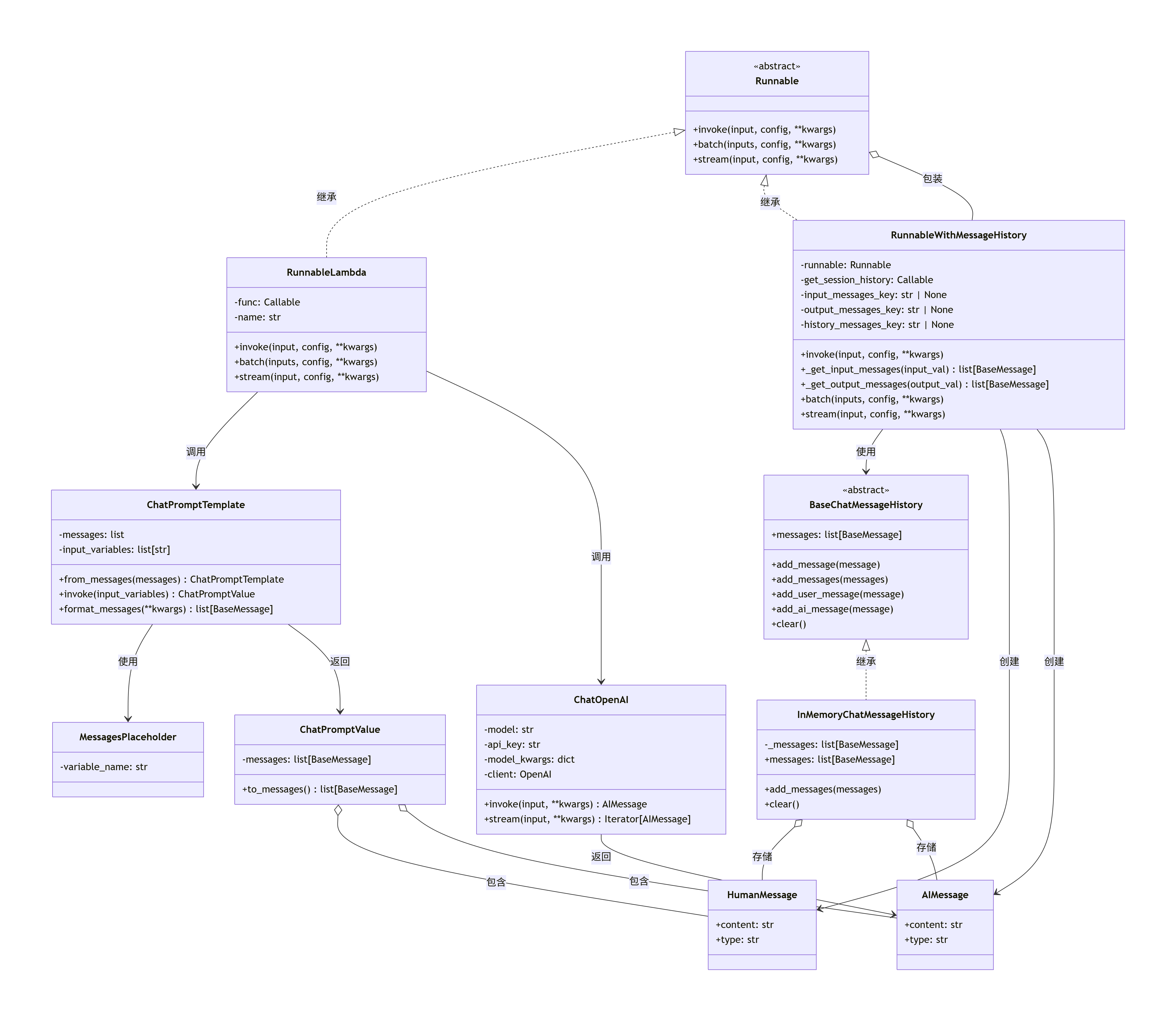
32.3.3 时序图 #
32.3.3.1 初始化阶段 #
32.3.3.2 第一轮对话 #
32.3.3.3 第二轮对话 #
32.3.4 调用过程详解 #
32.3.4.1 初始化阶段 #
创建
ChatPromptTemplateprompt = ChatPromptTemplate.from_messages([ ("system", "你是一个友好的 AI 助手。"), MessagesPlaceholder(variable_name="history"), ("human", "{question}"), ])- 创建模板,包含系统消息、历史占位符和用户问题占位符
创建
ChatDeepSeek实例llm = ChatDeepSeek(model="deepseek-chat", temperature=0.7)创建链式函数
def chain_func(input_dict): prompt_value = prompt.invoke(input_dict) return llm.invoke(prompt_value.messages) chain = RunnableLambda(chain_func)- 将
prompt → llm的流程封装为RunnableLambda
- 将
创建
RunnableWithMessageHistorychain_with_history = RunnableWithMessageHistory( chain, get_session_history=get_by_session_id, input_messages_key="question", history_messages_key="history", )- 包装
chain,自动管理历史消息
- 包装
32.3.4.2 调用阶段(第一轮对话) #
用户调用
chain_with_history.invoke( {"question": "我叫小明"}, config={"configurable": {"session_id": "session-1"}} )RunnableWithMessageHistory.invoke()执行- 从
config["configurable"]["session_id"]获取"session-1" - 调用
get_by_session_id("session-1")获取或创建历史对象 - 获取历史消息:
history.messages→[](第一轮为空)
- 从
准备输入
- 由于使用
history_messages_key="history",将历史消息添加到输入字典:input = { "question": "我叫小明", "history": [] # 第一轮为空 }
- 由于使用
调用底层
chain.invoke()chain_func(input_dict)执行prompt.invoke(input_dict)格式化消息:- 系统消息:
SystemMessage("你是一个友好的 AI 助手。") - 历史消息:
[](空) - 用户问题:
HumanMessage("我叫小明")
- 系统消息:
llm.invoke([SystemMessage, HumanMessage])调用 OpenAI API- 返回
AIMessage("你好,小明!...")
提取并保存消息
_get_input_messages({"question": "我叫小明"})→[HumanMessage("我叫小明")]_get_output_messages(AIMessage)→[AIMessage("你好,小明!...")]history.add_messages([HumanMessage, AIMessage])保存到历史
32.3.4.3 调用阶段(第二轮对话) #
用户调用
chain_with_history.invoke( {"question": "我的名字是什么?"}, config={"configurable": {"session_id": "session-1"}} )RunnableWithMessageHistory.invoke()执行- 获取
session_id = "session-1" - 调用
get_by_session_id("session-1")获取已有历史对象 - 获取历史消息:
history.messages→[HumanMessage("我叫小明"), AIMessage("你好,小明!...")]
- 获取
准备输入
input = {
    "question": "我的名字是什么?",
    "history": [
        HumanMessage("我叫小明"),
        AIMessage("你好,小明!...")
    ]
}
调用底层
chain.invoke()prompt.invoke(input_dict)格式化消息:- 系统消息:
SystemMessage("你是一个友好的 AI 助手。") - 历史消息:
[HumanMessage("我叫小明"), AIMessage("你好,小明!...")] - 用户问题:
HumanMessage("我的名字是什么?")
- 系统消息:
llm.invoke([SystemMessage, HumanMessage("我叫小明"), AIMessage("你好,小明!..."), HumanMessage("我的名字是什么?")])- 返回
AIMessage("你的名字是小明。...")
提取并保存消息
_get_input_messages({"question": "我的名字是什么?"})→[HumanMessage("我的名字是什么?")]_get_output_messages(AIMessage)→[AIMessage("你的名字是小明。...")]history.add_messages([HumanMessage, AIMessage])追加到历史
32.3.4.4 关键设计点 #
历史消息管理
- 通过
get_by_session_id()按session_id管理多个会话 - 每次调用自动读取历史并更新
- 通过
输入准备
- 使用
history_messages_key="history"将历史消息插入到输入字典 MessagesPlaceholder("history")从输入字典中读取历史消息
- 使用
消息提取
_get_input_messages()从原始输入中提取当前用户消息(不含历史)_get_output_messages()从输出中提取 AI 消息
历史更新
- 将当前输入消息和输出消息一起保存到历史
- 保证历史记录的完整性
32.3.4.5. 数据流图 #
用户输入 {"question": "我的名字是什么?"}
    ↓
RunnableWithMessageHistory.invoke()
    ↓
从 config["configurable"]["session_id"] 获取 "session-1"
    ↓
get_by_session_id("session-1") → 获取 InMemoryChatMessageHistory
    ↓
history.messages → [HumanMessage("我叫小明"), AIMessage("你好,小明!...")]
    ↓
准备输入:{"question": "我的名字是什么?", "history": [历史消息]}
    ↓
chain.invoke(input)
    ↓
prompt.invoke(input) → ChatPromptValue(messages=[SystemMessage, 历史消息, HumanMessage("我的名字是什么?")])
    ↓
llm.invoke(messages) → AIMessage("你的名字是小明。...")
    ↓
提取消息:input_messages = [HumanMessage("我的名字是什么?")], output_messages = [AIMessage("你的名字是小明。...")]
    ↓
history.add_messages([input_messages + output_messages])
    ↓
返回 AIMessage("你的名字是小明。...")
33.SQLChatMessageHistory #
相比内存历史(InMemoryChatMessageHistory),SQLChatMessageHistory 支持将聊天消息持久化存储到 SQLite 数据库文件中。其基本思想如下:
核心设计与接口
- 继承自统一的
BaseChatMessageHistory抽象类,提供一致的.messages读取接口和.add_message、.add_messages插入接口; - 通过
session_id字段区分不同会话的消息,每次调用时自动筛选/管理指定session_id的消息历史; - 构造时指定数据库文件路径(
db_path,默认 "chat_history.db")和表名(table_name,默认 "message_store"),确保表结构存在; - 读取消息时从数据库按
id升序查询所有属于该会话的消息,并转换为HumanMessage、AIMessage、SystemMessage等对象格式用于链条/模型推理; - 写入消息时自动将内容、发送角色、会话编号等写入数据库表,确保多进程/多会话环境下数据可靠性;
- 支持
.clear()快速删除指定会话的所有消息。
典型使用场景
- 聊天机器人中希望历史消息永久保存、支持恢复、迁移、统计分析等需求时,推荐使用 SQL 持久化方案;
- 多用户/多会话 Web/桌面应用场景,及时扩容和数据安全性更高。
代码实现亮点
- 初始化自动建表,检查/修复表结构不一致问题(兼容迁移升级场景);
- API 设计与
InMemoryChatMessageHistory保持一致,上层代码切换存储后端只需替换实例化方式; - 插入/读取消息时类型安全(自动识别角色类型),方便后续模型链直接消费。
优势对比
- 内存方案 更适合小规模临时对话,内存消耗小、速度快,但重启后丢失历史。
- SQL 方案 支持大量会话消息永久保存,便于数据分析与回溯,但性能依赖磁盘与数据库设计。
小结
将 SQLChatMessageHistory 与 RunnableWithMessageHistory 等消息感知链配合,就能很方便地实现多轮问答历史的可靠读写。只需更换一行历史工厂方法,既可以内存存储,也可以 SQL 持久化,非常灵活。
33.1. 33.SQLChatMessageHistory.py #
33.SQLChatMessageHistory.py
# 导入操作系统相关功能的模块
import os
#from langchain_deepseek import ChatDeepSeek
#from langchain_core.prompts import ChatPromptTemplate, MessagesPlaceholder
#from langchain_community.chat_message_histories import SQLChatMessageHistory
#from langchain_core.runnables import RunnableWithMessageHistory,RunnableLambda

# 导入自定义的对话模型、提示模板、消息历史和运行单元相关模块
from smartchain.chat_models import ChatDeepSeek
from smartchain.prompts import ChatPromptTemplate, MessagesPlaceholder
from smartchain.chat_history import SQLChatMessageHistory
from smartchain.runnables import RunnableWithMessageHistory, RunnableLambda

# 定义一个聊天会话历史的工厂函数,基于 SQLite 持久化每个 session 的聊天记录
def get_session_history(session_id: str):
    return SQLChatMessageHistory(
        session_id=session_id,
        db_path="chat_history.db",
    )

# 构建提示模板:首先加入系统角色,然后插入历史消息占位符,最后加入当前用户问题
prompt = ChatPromptTemplate.from_messages(
    [
        ("system", "你是一个友好的 AI 助手。"),
        MessagesPlaceholder(variable_name="history"),
        ("human", "{question}"),
    ]
)

# 设置环境变量,配置 DeepSeek 的 API Key
os.environ["DEEPSEEK_API_KEY"] = "sk-c4e682d07ed643e0bce7bb66f24c5720"

# 初始化大语言模型,指定模型名称和温度参数
llm = ChatDeepSeek(model="deepseek-chat", temperature=0.7)

# 定义链函数:先通过提示模板格式化输入,然后将生成的消息交给 llm 执行
def chain_func(input_dict):
    # 先格式化提示模板
    prompt_value = prompt.invoke(input_dict)
    # 调用大语言模型,返回回复内容
    return llm.invoke(prompt_value.messages)

# 用 RunnableLambda 包装链函数,形成一个可执行链条
chain = RunnableLambda(chain_func)

# 创建带消息历史自动管理(如插入历史记录)的链包装器
chain_with_history = RunnableWithMessageHistory(
    chain,
    get_session_history=get_session_history,     # 指定历史获取函数
    input_messages_key="question",              # input 字典中用户提问的键
    history_messages_key="history",             # input 字典中插入历史的键
)

# ===== 演示多轮对话 =====

# 打印第一轮对话标题
print("【第一轮】")
# 执行第一轮会话,用户输入“我叫小明”,指定 session_id
resp1 = chain_with_history.invoke(
    {"question": "我叫小明"},
    config={"configurable": {"session_id": "session-1"}},
)
# 打印用户输入和 AI 回复
print("用户:我叫小明")
print(f"AI:{resp1.content}\n")

# 打印第二轮对话标题
print("【第二轮】")
# 执行第二轮会话,用户再次提问,指定相同 session_id
resp2 = chain_with_history.invoke(
    {"question": "我的名字是什么?"},
    config={"configurable": {"session_id": "session-1"}},
)
# 打印用户输入和 AI 回复
print("用户:我的名字是什么?")
print(f"AI:{resp2.content}\n")

# ===== 显示历史记录(从数据库读取) =====
# 取出指定 session 的历史消息
history = get_session_history("session-1")
# 打印分隔符行
print("=" * 50)
# 打印历史记录标题
print("历史记录:")
# 遍历历史消息,按顺序编号并打印角色和内容
for i, msg in enumerate(history.messages, 1):
    # 判断消息角色类型
    role = "用户" if getattr(msg, "type", "") == "human" else "AI"
    print(f"{i}. [{role}] {msg.content}")
33.2. chat_history.py #
smartchain/chat_history.py
# 导入抽象基类ABC,以及抽象方法abstractmethod
from abc import ABC, abstractmethod
+from ast import Dict
+from typing import Any, Optional, Union
# 从当前包的messages模块导入基础消息类、人类消息类和AI消息类
+from .messages import BaseMessage, HumanMessage, AIMessage,SystemMessage
+import sqlite3
# 定义聊天消息历史的抽象基类,继承自ABC
class BaseChatMessageHistory(ABC):
    """
    聊天消息历史的抽象基类

    定义了存储和管理聊天消息历史的标准接口。
    """

    # 定义抽象属性messages,要求子类实现
    @property
    @abstractmethod
    def messages(self):
        """
        获取所有消息列表

        Returns:
            消息列表
        """
        pass

    # 添加用户消息的便捷方法,可以接收HumanMessage实例或字符串
    def add_user_message(self, message):
        """
        添加用户消息的便捷方法

        Args:
            message: HumanMessage 实例或字符串
        """
        # 如果参数已是HumanMessage实例,则直接添加
        if isinstance(message, HumanMessage):
            self.add_message(message)
        # 否则,将字符串封装成HumanMessage后添加
        else:
            self.add_message(HumanMessage(content=message))

    # 添加AI消息的便捷方法,可以接收AIMessage实例或字符串
    def add_ai_message(self, message):
        """
        添加 AI 消息的便捷方法

        Args:
            message: AIMessage 实例或字符串
        """
        # 如果参数是AIMessage实例,则直接添加
        if isinstance(message, AIMessage):
            self.add_message(message)
        # 否则,将字符串封装成AIMessage后添加
        else:
            self.add_message(AIMessage(content=message))

    # 添加单个消息,可以接收BaseMessage实例
    def add_message(self, message):
        """
        添加单个消息

        Args:
            message: BaseMessage 实例
        """
        # 实际上是调用批量添加,将单个消息变为只包含一个元素的列表
        self.add_messages([message])

    # 批量添加消息
    def add_messages(self, messages):
        """
        批量添加消息

        Args:
            messages: 消息列表
        """
        # 遍历所有消息
        for message in messages:
            # 检查类型是否为BaseMessage子类
            if not isinstance(message, BaseMessage):
                raise TypeError(f"消息必须是 BaseMessage 实例,但得到了 {type(message)}")
            # 调用子类实现的消息添加逻辑
            self._add_message_impl(message)

    # 定义抽象方法,子类需实现具体的单条消息添加逻辑
    @abstractmethod
    def _add_message_impl(self, message):
        """
        子类需要实现的添加消息的具体逻辑

        Args:
            message: BaseMessage 实例
        """
        pass

    # 定义抽象方法,子类需实现清空历史的具体逻辑
    @abstractmethod
    def clear(self):
        """清空所有消息"""
        pass


# 定义内存中的聊天消息历史实现类,继承自BaseChatMessageHistory
class InMemoryChatMessageHistory(BaseChatMessageHistory):
    """
    内存中的聊天消息历史实现

    将消息存储在内存列表中,适用于单进程应用。

    示例:
        python
        from smartchain.chat_history import InMemoryChatMessageHistory

        history = InMemoryChatMessageHistory()
        history.add_user_message("你好")
        history.add_ai_message("你好,有什么可以帮助你的吗?")

        # 获取所有消息
        messages = history.messages

        # 清空历史
        history.clear()
        ``
    """

    # 初始化方法,创建用于存储消息的私有列表
    def __init__(self):
        """初始化内存消息历史"""
        # 使用列表存储消息
        self._messages = []

    # 实现messages属性,返回消息列表的副本,避免外部修改内部状态
    @property
    def messages(self):
        """
        获取所有消息列表

        Returns:
            消息列表的副本
        """
        return self._messages.copy()

    # 实现消息添加逻辑,将收到的消息追加到列表末尾
    def _add_message_impl(self, message):
        """
        实现添加消息的具体逻辑

        Args:
            message: BaseMessage 实例
        """
        self._messages.append(message)

    # 清空内存中的所有消息
    def clear(self):
        """清空所有消息"""
        self._messages = []

    # 对象的字符串表示,用于便于调试
    def __repr__(self):
        """返回对象的字符串表示"""
        return f"InMemoryChatMessageHistory(messages={len(self._messages)})"
# 定义一个使用SQLite存储聊天消息历史的类,继承自BaseChatMessageHistory
+class SQLChatMessageHistory(BaseChatMessageHistory):
+   """
+   使用 SQLite 存储聊天消息历史。

+   参数:
+       session_id: 会话唯一标识
+       db_path: SQLite 数据库路径(字符串)
+       table_name: 表名,默认 "message_store"
+   """

    # 初始化方法,设置会话ID,数据库路径和表名,并确保表存在
+   def __init__(
+       self,
+       session_id,
+       db_path=None,
+       table_name="message_store",
+   ):
        # 保存会话唯一标识session_id
+       self.session_id = session_id
        # 保存数据库路径
+       self.db_path = db_path
        # 初始化数据库连接为None,延迟连接
+       self._connection = None
        # 保存要使用的数据表名
+       self.table_name = table_name
        # 确保数据表存在,如果不存在则创建该表
+       self._ensure_table()

    # 获取数据库连接的方法
+   def _get_connection(self):
        # 如果还没有数据库连接,则创建一个到指定db_path的连接
+       if self._connection is None:
+           self._connection = sqlite3.connect(self.db_path)
        # 返回数据库连接
+       return self._connection

    # 消息属性方法,用于获取该会话对应的历史消息
+   @property
+   def messages(self):
        # 获取数据库连接
+       conn = self._get_connection()
        # 创建一个游标对象用于执行SQL语句
+       cur = conn.cursor()
        # 执行查询,按照ID升序获取属于当前session_id的消息角色和内容
+       cur.execute(
+           f"SELECT role, content FROM {self.table_name} WHERE session_id=? ORDER BY id ASC",
+           (self.session_id,),
+       )
        # 获取所有查询结果
+       rows = cur.fetchall()
        # 创建一个空列表用于存储消息对象
+       result = []
        # 遍历每一行,生成不同类型的消息对象并添加到结果中
+       for role, content in rows:
            # 如果角色是human,构造HumanMessage对象
+           if role == "human":
+               result.append(HumanMessage(content=content))
            # 如果角色是ai,构造AIMessage对象
+           elif role == "ai":
+               result.append(AIMessage(content=content))
            # 如果角色是system,构造SystemMessage对象
+           elif role == "system":
+               result.append(SystemMessage(content=content))
            # 其他未知角色,默认作为HumanMessage
+           else:
+               result.append(HumanMessage(content=content))
        # 返回消息对象的列表
+       return result

    # 一次性添加多条消息到数据库的方法
+   def add_messages(self, messages):
        # 获取数据库连接
+       conn = self._get_connection()
        # 创建游标
+       cur = conn.cursor()
        # 遍历所有消息对象
+       for m in messages:
            # 尝试获取消息的type属性作为角色
+           role = getattr(m, "type", None)
            # 如果type属性不存在,默认角色为human
+           if role is None:
+               role = "human"
            # 获取消息内容
+           content = getattr(m, "content", "")
            # 将消息插入数据库中
+           cur.execute(
+               f"INSERT INTO {self.table_name} (session_id, role, content) VALUES (?, ?, ?)",
+               (self.session_id, role, content),
+           )
        # 提交事务,确保数据写入
+       conn.commit()

    # 内部方法,添加单条消息
+   def _add_message_impl(self, message):
        # 调用add_messages方法添加一条消息
+       self.add_messages([message])

    # 清空指定会话的所有消息
+   def clear(self):
        # 获取数据库连接
+       conn = self._get_connection()
        # 创建游标
+       cur = conn.cursor()
        # 执行删除语句,移除属于当前session_id的所有消息
+       cur.execute(
+           f"DELETE FROM {self.table_name} WHERE session_id=?",
+           (self.session_id,),
+       )
        # 提交事务
+       conn.commit()

    # 返回对象的字符串表示,显示历史消息的数量
+   def __repr__(self):
+       return f"SQLChatMessageHistory(messages={len(self.messages)})"

    # 确保数据库表存在的方法
+   def _ensure_table(self):
        # 获取数据库连接
+       conn = self._get_connection()
        # 创建游标
+       cur = conn.cursor()
        # 创建表(如果不存在),包含id、session_id、role、content四个字段
+       cur.execute(
+           f"""
+           CREATE TABLE IF NOT EXISTS {self.table_name} (
+               id INTEGER PRIMARY KEY AUTOINCREMENT,
+               session_id TEXT,
+               role TEXT,
+               content TEXT
+           )
+           """
+       )
+       try:
            # 检查表结构,尝试查询表中的一行
+           cur.execute(f"SELECT role, content FROM {self.table_name} LIMIT 1")
+       except Exception:
            # 如果表结构有误,则先删除再重建表(注意这样会丢失数据,仅适合开发调试)
+           cur.execute(f"DROP TABLE IF EXISTS {self.table_name}")
+           cur.execute(
+               f"""
+               CREATE TABLE {self.table_name} (
+                   id INTEGER PRIMARY KEY AUTOINCREMENT,
+                   session_id TEXT,
+                   role TEXT,
+                   content TEXT
+               )
+               """
+           )
        # 提交事务
+       conn.commit()
33.3 类 #
33.3.1 类说明 #
| 类名 | 主要功能 | 关键方法/属性 |
|---|---|---|
| ChatDeepSeek | DeepSeek 聊天模型封装,调用 API 生成回复 | invoke(input) - 调用模型生成回复 |
| ChatPromptTemplate | 聊天提示模板,格式化消息列表 | from_messages() - 从消息列表创建模板invoke(input_variables) - 格式化模板 |
| MessagesPlaceholder | 消息占位符,用于在模板中插入历史消息 | variable_name - 占位符变量名 |
| SQLChatMessageHistory | SQLite 持久化聊天历史管理 | messages - 获取历史消息列表add_messages() - 添加消息到历史 |
| RunnableWithMessageHistory | 带历史管理的 Runnable 包装器,自动处理历史消息 | invoke(input, config) - 执行调用并管理历史 |
| RunnableLambda | 将普通函数包装为 Runnable | invoke(input, config) - 执行包装的函数 |
| BaseMessage | 消息基类 | content - 消息内容type - 消息类型 |
| HumanMessage | 用户消息类 | 继承自 BaseMessage,type="human" |
| AIMessage | AI 回复消息类 | 继承自 BaseMessage,type="ai" |
| SystemMessage | 系统消息类 | 继承自 BaseMessage,type="system" |
| ChatPromptValue | 格式化后的提示值 | messages - 消息列表to_messages() - 转换为消息列表 |
33.3.2 类图 #
33.3.3 时序图 #
33.3.3.1 第一轮对话 #
33.3.3.2 第二轮对话 #
33.3.4 调用流程 #
33.3.4.1 初始化阶段 #
创建提示模板 (
prompt)- 使用
ChatPromptTemplate.from_messages()创建模板 - 包含:系统消息、历史消息占位符(
MessagesPlaceholder)、用户问题占位符
- 使用
创建模型实例 (
llm)- 使用
ChatDeepSeek创建,配置模型名和温度
- 使用
定义链函数 (
chain_func)- 接收输入字典,调用
prompt.invoke()格式化 - 将格式化结果传给
llm.invoke()生成回复
- 接收输入字典,调用
包装为 Runnable (
chain)- 使用
RunnableLambda包装chain_func
- 使用
创建历史管理包装器 (
chain_with_history)- 使用
RunnableWithMessageHistory包装chain - 配置历史获取函数和键名
- 使用
33.3.4.2 执行阶段 #
步骤 1:用户调用
chain_with_history.invoke(
    {"question": "我叫小明"},
    config={"configurable": {"session_id": "session-1"}}
)
步骤 2:RunnableWithMessageHistory 处理
- 从
config提取session_id = "session-1" - 调用
get_session_history("session-1")获取历史对象 - 读取历史消息(首次为空)
- 构建输入字典:
{
    "question": "我叫小明",
    "history": []  # 历史消息列表
}
步骤 3:执行底层 Runnable
RunnableLambda调用chain_func(input_dict)chain_func调用prompt.invoke(input_dict)
步骤 4:格式化提示模板
ChatPromptTemplate.invoke()处理:- 系统消息:
SystemMessage("你是一个友好的 AI 助手") - 历史占位符:替换为
history的值(空列表) - 用户问题:
HumanMessage("我叫小明")
- 系统消息:
- 返回
ChatPromptValue(messages=[SystemMessage, HumanMessage])
步骤 5:调用模型
llm.invoke(prompt_value.messages)调用 DeepSeek API- 返回
AIMessage("你好,小明!很高兴认识你。")
步骤 6:更新历史
RunnableWithMessageHistory将本轮输入和输出添加到历史:history.add_messages([ HumanMessage("我叫小明"), AIMessage("你好,小明!很高兴认识你。") ])SQLChatMessageHistory将消息写入 SQLite
步骤 7:返回结果
- 返回
AIMessage给用户
33.3.4.3 第二轮对话的差异 #
- 历史消息不为空:包含第一轮的对话记录
- 提示模板包含历史:模型能看到上下文
- 模型基于上下文回答:能回答“你的名字是小明”
33.4 数据流图 #
用户输入
  ↓
RunnableWithMessageHistory
  ├─→ 读取历史 (SQLChatMessageHistory → SQLite)
  ├─→ 构建完整输入字典
  │     ├─ question: "我的名字是什么?"
  │     └─ history: [HumanMessage("我叫小明"), AIMessage("你好,小明!...")]
  │
  └─→ 调用底层 Runnable
        ↓
      RunnableLambda (chain_func)
        ↓
      ChatPromptTemplate.invoke()
        ├─→ 格式化系统消息
        ├─→ 插入历史消息
        └─→ 格式化用户问题
        ↓
      ChatPromptValue (包含完整消息列表)
        ↓
      ChatDeepSeek.invoke()
        ├─→ 转换为 API 格式
        ├─→ 调用 DeepSeek API
        └─→ 返回 AIMessage
        ↓
      RunnableWithMessageHistory
        ├─→ 保存本轮对话到历史
        └─→ 返回 AIMessage
        ↓
      用户输出